Thursday, December 4, 2008

Facebook sets up new horizon in Social Networking ::

Facebook invented a new technology by enabling users to browse other sites through networking portal. The system is called 'Connect'. It lets Facebook users to access other websites by using their login credentials. This system also provides feedback about a user's friend's activity on those partner websites.The first few sites, which can be viewed by using 'Connect' are Discovery Channel, social news sites e.g. Digg, as well as some video sites e.g. Hulu.

One of Facebook's biggest rivals MySpace has already rolled out somewhat similar system, so the launch of Connect is Facebook's response to their rivals.

These built-in tools for sociallising on these sites such as MySpace and Facebook will help friends to virtually gather at one place to watch a video via video hosting site Hulu and chat about it. Developers can add rich social context to their site. Inclusion of these tools will make social networking sites more all-encompassing portal and automatically become more attractive to advertisers.

In order to avoid the same mistake that happened during the launch of their prior application Beacon, which resulted a bad response, Facebook said it would support all those sites that wanted to be engaged with Connect and review what they will do with the data gathered about members.

With Facebook connect users can bring their login information with them wherever they go on the web. It will also be a dynamic security application, as a user moves around the open web, their privacy settings will follow them, which ensures that users's information and privacy settings are always up to date.

Here are four upcoming primary features of Facebook Connect :

- > Trusted Authentication : Users will be able to connect their Facebook account with any partner website using a trusted authentication method, e.g. SSL.

- > Real Identity : With Facebook Connect, users can bring their real identity information with them wherever they go on the Web.

- > Friends Access : With Facebook Connect, users can take their friends with them wherever they go on the Web.

- > Dynamic Privacy : It will ensure users' profile is always up to date, while they make any change while roaming around the participant websites.

You can have more knowledge about Facebook Connect and developers can get information about how to register their websites in Facebook Connect by clicking on this following link:
http://wiki.developers.facebook.com/index.php/Facebook_Connect

Thursday, November 27, 2008

Build Your Search Service:

BOSS, is an open search web service platform by Yahoo with an aim to “foster innovations in search industry”.

Yahoo opened its search infrastructure around four months back giving developers an opportunity to use Yahoo’s core search technology to build their own search engine.

The queries sent via yahoo API returns 50 results in XML or JSON format along with imposed ads from yahoo displayed next to or within the result. Yahoo may impose some fees associated with the search if the developer decides to keep the search ad free. One exception to this imposition will be the academic developers.

The developers are free to hide the fact that their search is based on Yahoo. Another benefit is the fact that it does not impose any upper limit to the number queries searched or on the design of the page.

Now, the main differences between BOSS and Google’s Ajax is that the former is found to be more developer-friendly offering more features and flexibility, for example there is an option of getting XML output. Also, use of BOSS doesn't require "a valid and accurate http referrer header" as in case of AJAX.

BOSS is a bold move and is getting popular among developers. HAKIA and Med.ium have already moved to BOSS. Yahoo plans to give even more flexibility to the developers by allowing the developers to push their own data for indexing.

Read more (references):
http://developer.yahoo.com/search/boss/

http://googlesystem.blogspot.com/2008/04/google-search-rest-api.html

http://www.techcrunch.com/2008/07/09/yahoo-radically-opens-web-search-with-boss/

ATTRIBUTES IN DBMS AND ER MODELING

Attributes
* The set of possible values for an attribute is called the domain of the attribute
Example:
o The domain of attribute marital status is having four values: single, married, divorced or widowed.
o The domain of the attribute month is having twelve values ranging from January to December.
* Key attribute: The attribute (or combination of attributes) that is unique for every entity instance
o E.g.: the account number of an account, the employee id of an employee etc.
* If the key consists of two or more attributes in combination, it is called a composite key
Simple Vs composite attribute
* Simple attribute: cannot be divided into simpler components
E.g.: age of an employee
* Composite attribute: can be split into components
E.g.: Date of joining of the employee.
* Can be split into day, month and year
Single Vs Multi-valued Attributes
* Single valued : can take on only a single value for each entity instance
E.g.: age of employee. There can be only one value for this.
* Multi-valued: can take up many values
E.g.: skill set of employee
stored Vs Derived attribute
* Stored Attribute: Attribute that need to be stored permanently.
+ E.g.: name of an employee
* Derived Attribute: Attribute that can be calculated based on other attributes.
+ E.g. : years of service of employee can be calculated from date of joining and current date
Regular Vs. Weak entity type
* Regular Entity: Entity that has its own key attribute (s).
E.g.: Employee, student ,customer, policy holder etc.
* Weak entity: Entity that depends on other entity for its existence and doesn’t have key attribute (s) of its own
E.g. : spouse of employee
Relationships
* A relationship type between two entity types defines the set of all associations between these entity types
* Each instance of the relationship between members of these entity types is called a relationship instance
* E.g if Works-for is the relationship between the Employee entity and the department entity, then Rohan works-for CSE department,
Riya works – for EEE department ..etc are relationship instances of the relationship, works-for
Degree of a Relationship
* Degree: the number of entity types involved
# One Unary
# Two Binary
# Three Ternary
E.g: employee manager-of employee is unary
employee works-for department is binary
customer purchase item, shop keeper is a ternary relationship
Cardinality
* Relationships can have different connectivity
o one-to-one (1:1)
o one-to-many (1:N)
o many-to- One (M:1)
o many-to-many (M:N)
E.g.:
Employee head-of department (1:1)
Lecturer offers course (1:N) assuming a course is taught by a single lecturer
Student enrolls course (M:N)
Relationship Participation
* Total : Every entity instance must be connected through the relationship to another instance of the other participating entity types
* Partial: All instances need not participate
E.g.: Employee Head-of Department
Employee: partial
Department: total
ER Modeling - Notations
Steps in ER Modeling
* Identify the Entities
* Find relationships
* Identify the key attributes for every Entity
* Identify other relevant attributes
* Draw complete E-R diagram with all attributes including Primary Key
* Review your results with your Business users

These are some issues regarding attributes and ER modeling.
Some content taken from wikipedia.

Sunday, November 23, 2008

How To Create An MSN Robot

From the incesoft website, one can create an MSN robot using the ibot platform provided by the site.
“You can create your own robot simply by following steps:
1.
Go to the website Home of Service Provider to register as a service provider of Incesoft iBot Platform
2.
Download the Incesoft iBot Platform SDK from the website
3.
Create your own robot with the SDK and run”

From the very beginning, you should register one MSN account for yourself to be the view of the robot, because only when you have the MSN account, you can access to Microsoft MSN server and use those sending message or receiving message functions.
Then register an Incesoft robot holder account to get service of holding your MSN account accessible and running your customized program.
After that, please provide your account’s username and password to Incesoft website, and your program later. When the account is activated, then there would be a new “user” which keeps online. Everyone sends a message to this “user”, the information would be sent to Incesoft’s server. The server would find the corresponding holding program and put the message onto this program. There would generate a reply through the program rules, and finally send it back to the source.
It would be OK if you only upload the MSN account information without the rule program. When you active the MSN account on the holder server, you could see that "user" is online. But whatever you send to this "user", there would be no reply.

Thursday, November 20, 2008

Gmail account is now an OpenID

Currently, many websites require user to apply an account to visit it. However, the application is such a bothering procedure. Sometimes, when the number of your accounts increasing, you may forget your userID or corresponding password. So in this scenario, the Concept of OpenID comes out. “OpenID is a shared identity service, which allows Internet users to log on to many different web sites using a single digital identity, single sign-on, eliminating the need for a different user name and password for each site. OpenID is a decentralized, free and open standard that lets users control the amount of personal information they provide.” Now, Google has moves towards single sign-on with OpenID, and Gmail becomes an OpenID after Yahoo ID does. It complies with the protocol of OpenID. Along with the increase of OpenID applications, you may be released form the fussy procedure when visiting websites in the near future. However, Gmail, in the current phrase, just has a few applications in terms of OpenID. You can test your google account on Zoho.com. However, the security of Gmail is very important issue we should take care of. So one’s most important Gmail account is not encouraged to be used anywhere as OpenID.

Wednesday, November 19, 2008

INTRODUCTION TO SQL

SQL
* SQL is used to make a request to retrieve data from a Database.
* The DBMS processes the SQL request, retrieves the requested data from the Database, and returns it.
* This process of requesting data from a Database and receiving back the results is called a Database Query and hence the name Structured Query Language
* SQL is a language that all commercial RDBMS implementations understand.
* SQL is a non-procedural language
* We would be discussing SQL with respect to oracle syntax
statements:These are the statements present.
* DDL (Data Definition Language)
o Create,Alter,Drop,Truncate
* DML (Data Manipulation Language)
o Insert,Update,Delete,Select
* DCL (Data Control Language)
o Grant,Revoke,Commit,Rollback
Data types are
* Number,Char,Varchar2,Long,date
NULL
* Missing/unknown/inapplicable data represented as a NULL value
* NULL is not a data value. It is just an indicator that the value is unknown
Operators
* Arithmetic operators: +, -, *, /
* Logical operators: AND, OR, NOT
* Relational operators: =, <=, >=, < >, < , >

SQL Data Definition Language
Types Of Constraints available are:
* Column Level
* Table level
Types Of Constraints
* Primary Key Constraint
* Foreign Key Constraint
* Unique Constraint
* Check Constraint
* Not Null Constraint
There is a lot to say about SQL.This is just the introduction about the types of constraints and few more things.
Some content from wikipedia.

Microsoft is providing free Anti-virus from end of June 2009

Microsoft is providing its all in one security software from the end of June 2009. This is a surprise move by Microsoft since it has the strategy of not providing any programs free of cost.The antivirus software is called "Morro", and will be suitable for smaller and less powerful computers.

It will support the operating system like Windows XP, Vista and upcoming version "Windows 7."

Microsoft has made this transition because "OneCare" service is booming in the field of security software and hence Microsoft is afraid of losing its market in the particular field. This is another business strategy of Microsoft.

Since its launch in May 2006, OneCare has garnered less than 2% of the security software market share.

In a statement, Microsoft said that Morro would be designed specifically to be a small-footprint program that uses fewer system resources. This, it said, would be ideal for users with low-bandwidth connections or computers without much processing power. (ref bbc news)


Adobe Dreamweaver

Just a bit of information for the project layout developers.

Adobe Dreamweaver is a web development application originally created by Allaire Systems, which was acquired by Macromedia and now owned by Adobe Systems.

Dreamweaver is available for both Mac and Windows Operating Systems. Support for various web technologies such as CSS, Javascript and various server - side scripting languages and frameworks including ASP.NET, COLD FUSION, Java Server pages and PHP have been developed.

Features of Dreamweaver :

Dreamweaver can hide the HTML code details of pages from the user, making it possible for non - coders t create web pages and sites. It allows users to preview websites in many browsers, provided that they are installed on their computer. It also has some site management tools and a templatisation feature for creating multiple pages with similar structures.

Dreamweaver can use " Extensios " small programs, which any web developer can write (usually in HTML and Javascript). Like other HTML editors, Dreamweaver edits files locally, then uploads all edited files to the remote web server using FTP, SFTP or WebDav.

As of version 6, Dreamweaver supports the following languages:

  • Active Server Pages (ASP)
  • ASP. NET
  • C#
  • Cascading Style Sheets (CSS)
  • Extensible Hypertext Markup Language (XHTML)
  • Extensible Markup Language (XML)
  • Hyper Text Markup Language (HTML)
  • Java
  • JavaScript
  • Java Server Pages (JSP)
  • PHP : Hypertext Preprocessor (PHP)
  • Visual Basic (VB)
  • Wireless Markup Language (WML)

Website Navigation

Website Navigation is important to the success of your website visitor's experience to your website. The website's navigation system is like a roadmap to all the different areas and information contained within the website.

Using a constant navigation schema from page to page helps the website visitor learn your website navigation system.

Out of different types of navigation systems few of them are
  • Hierarchial Website Navigation
  • Global Website Navigation
  • Local Website Navigation
Website Navigation System can follow number of styles:

  • Text Links
  • Bread Crumbs
  • Navigation Bar
  • Tab navigation
  • Sitemap
  • Dropdown Menu
  • Flyout Menu
  • Named Anchors

Tips to develop effective website navigation system:

  • To be consistent throughout the website. Any visitor to website learns through repitition.
  • Needs the main navigation links kept together
  • Needs reduced clutter by grouping links into sections.
  • If the number of clicks to the web page the visitor wishes to visit in minimal clicks,
  • this leads to a better experience.

Creating a website navigation system at planning stage of website will effect overall
design of webpage layout and help develop overall plan for the website.

Tuesday, November 18, 2008

CrowdSourcing:

Crowdsourcing was coined by Jeff Howe in 2006 in an article in Wired magazine. It is all about getting task done by an undefined mass of people. These are not regular employees or a body of people who get your outsourced work, but these are the people who were once categorized as amateurs, hobbyist, part timers etc. and can help you get a work done for much cheaper cost as compared to having a full time employee and saves on time as well.

A successful example of crowdsourcing is Wikipedia where the task of writing in an article is shared by a very large group of people and the task of maintaining the Wiki standards is also taken care of by the people. These set of people are in turn the customers of Wikipedia.

Web 2.0 entrepreneurs can use crowdsourcing for the growth and viability of their internet based business. The customers can be involved in generating ideas, helping in product design and even giving the final product its shape.

Thursday, November 13, 2008

Week 12: CMPS 598 Co. gears up, dives into product development

The CMPS 598 co. have decided to invest on the idea of building a Virtual ACTR Network.

ACTR stands for Advanced Computer Technology and Research Hall. It is the home of CACS and Computer Science Department. Through this application, we want to provide an online information center of ACTR, including its facility, residents, and events ... We will also implement an unique "Tangible Social Network" concept that was invented in the class.

Here is how we see the application that we are creating:

The Virtual ACTR Network is an online information center about ACTR and social network tangible to its stakeholders.

For Students: It is a virtual living space. Students get answers to questions on coursework, exchange notes, share latest in technology, research together, learn about job and internship opportunities, meet their friends, professors and mentors.

For Faculty and Staff: It is a medium. They share, publish information about their research projects and interests, classes that they teach. They connect with students and other potential collaborators.

For Businesses: It is a market space. They can advertise, recruite future employees, and do market study.

For Administrations: It is another effective information source/communication channel

For Guests: They get a virtual tour. They can get live and “tangible” info about ACT.

For Alumni: They will find their own Carbon foot print which will remind them –“In those old good times …”

Many things are happening in CMPS 598 Co. We prepared and made pitch presentations to some of our advisers, made some mockup pages, and did a user survey yesterday and got interesting results. Some of these materials can be found at: http://www.cacs.louisiana.edu/~zwu/cmps598/intro.html

We are busy with writing a business plan, building use cases, setting up database schema, setting up the development environment and educating ourselves on new technologies.

A little bit more than 3 weeks is left for CMPS 598 class, i.e. 3 weeks left for our company's "product release". Time is so limited ...

RSS - Really Simple Syndication

Hola,

I have been wondering what to write.. Suddenly this word striked me 'RSS'. Its been around the corner of every webpage for a while . I never cared to check what exactly it is.
Finally I thought to hunt it down for myself and share it with you. This is what I found -

So, What is RSS ?

Wikipedia says -

RSS is a family of Web feed formats used to publish frequently updated works—such as blog entries, news headlines, audio, and video—in a standardized format.

An RSS document (which is called a "feed", "web feed",[3] or "channel") includes full or summarized text, plus metadata such as publishing dates and authorship.
Web feeds benefit publishers by letting them syndicate content automatically. They benefit readers who want to subscribe to timely updates from favored websites or to aggregate feeds from many sites into one place.

So, how do you view it now?

RSS feeds can be read using software called an "RSS reader", "feed reader", or "aggregator", which can be web-based or desktop-based.

A standardized XML file formatallows the information to be published once and viewed by many different programs.
The user subscribes to a feed by entering the feed's URI (often referred to non-technically as a URL) into the reader or by clicking an RSS icon in a browser that initiates the subscription process.

The RSS reader checks the user's subscribed feeds regularly for new work, downloads any updates that it finds, and provides a user interface to monitor and read the feeds.

Wow that's cool !

Here goes another definition of RSS -


RSS is a mechanism used to distribute news content without depending on the browser or email client. Not everyone agrees precisely what RSS stands for, but “Really Simple Syndication” is a popular choice.
What are the advantages of RSS?

In general it means time savings because, thanks to RSS, you stay ahead of what’s new without having to browse every site you normaly visit. An RSS reader aggregates the content for you to view in one place, this saves time and brings you the content like when you're reading a newspaper with the advantage to view only headlines. You're in control of which articles you want to read.

RSS enabled sites

The following type of sites are typically now RSS-enabled;

- News services
- Databases
- many web logs (commonly called "blogs")

It will be a very good decision if we can add 'RSS' into our new web site 'SPARSH'. We can update data like News, Events , Blogs and other frequently updated works.

Between the academic world and the business world: Revisit

As it is an entrepreneurship class, we have been trying to work together in an simulated company setting. We had some discussion on what is different between the university class setting and a IT company setting.

Yesterday, I came cross an "old" article "Bill Gates's 11 Rules of Life", it has the text of one of his talks to a group of high school students. I feel that many of the 11 rules addressed the our issue too.

Here are some of the relevant rules that I picked:

Rule
1: Life is not fair -- get used to it!
Rule 2: The world won't care about your self-esteem. The world will expect you to accomplish something BEFORE you feel good about yourself.
Rule 4: If you think your teacher is tough, wait till you get a boss. (My favorite one, BTW)
Rule 5: Flipping burgers is not beneath your dignity. Your Grandparents had a different word for burger flipping -- they called it opportunity.
Rule 8: Your school may have done away with winners and losers, but life HAS NOT. In some schools they have abolished failing grades and they'll give you as MANY TIMES as you want to get the right answer. This doesn't bear the slightest resemblance to ANYTHING in real life.
Rule 9: Life is not divided into semesters. You don't get summers off and very few employers are interested in helping you FIND YOURSELF. Do that on your own time.

You can read the 11 rules at many websites, one of it is provided here.

Relationalship model basics:

Relational model basics

* Data is viewed as existing in two dimensional tables known as relation.
* A relation (table) consists of unique attributes (columns) and tuples (rows)
* Tuples are unique
* Sometimes the value to be inserted into a particular cell may be unknown, or it may have no value. This is represented by a NULL
* Null is not the same as zero, blank or an empty string
* Relational Database: Any database whose logical organization is based on relational data model.
* RDBMS: A DBMS that manages the relational database.

* Keys

* Candidate key
A Candidate key is a set of one or more attributes(minimal) that can uniquely identify a row in a given table.

* Primary Key
During the creation of the table, the Database Designer chooses one of the Candidate Key from amongst the several available, to uniquely identify row in the given table.

* Alternate Key
The candidate key that is chosen to perform the identification task is called the primary key and the remaining candidate keys are known as alternate keys.

* Super Key
Any superset of a candidate Key is a super key.

Key and Non-key Attributes

* Key Attributes
The attributes that participate in the Candidate key are Key Attributes

* Non-Key Attributes
The attributes other than the Candidate Key attributes in a table/relation are called Non-Key attributes.

OR
The attributes which do not participate in the Candidate key.

Foreign key
A Foreign Key is a set of attribute (s) whose values are required to match values of a column in the same or another table.

Database Design Techniques

* Top down Approach
o E R Modeling
* Bottom Up approach
o Normalization

ER modeling

* ER modeling: A graphical technique for understanding and organizing the data independent of the actual database implementation.

* Entity: Any thing that may have an independent existence and about which we intend to collect data.

Also known as Entity type. E.g.: Trainee

* Entity instance: a particular member of the entity type e.g. a particular trainee

* Attributes: Properties/characteristics that describe entities: Trainee name, Batchname, DOB, Address, etc.

* Relationships: Associations between entities.E.g.: Trainee belongs to a Batch
This is Relationship mode basics.
Some content taken from wikipedia and infosys Site.

Wednesday, November 12, 2008

Relational database

Some concepts of database:
A relational database structures data in tables, tables could be regarded as matrixes with columns and rows. Columns mean the title, the categories while rows contain the actual data for each category. Columns are also called “fields”, and rows are also called “records”.
Entity table: a table which is used to store things that are in the real world. We use different categories to describe those aspects of those things to make them different from other records.
Relation table: a table which specify the relation between the entity tables.
Primary Key: a primary key is a field that each record’s data in this field could not be the same as others. This data should be unique. In the database design, for every entity table, there should be a field that is defined as a primary key. It would also be good to define such a primary key for the relation table to make the records easier to reach.
That might be some rules that we should set up to make our database more structured and easy to be used and maintained.

In my opinion, there should be a primary key field called “id” in each table. We could use this field to be the index of each table. Also we should put the data created date and the data modified date to make it possible to trace the modification of each record. In those tables which could be modified by users (other than those only be controlled by the administrator) we may put in a field to specify who create this record. Together with the created date and the modified date, it would be easy to control and trace the data.
Any other idea for the database schema? I think that we should decide some common rules for the database structure first.

Is Facebook the Next Geocities?

This is the question brought out by Andrew Goodman. 1999, Yahoo! Spent 3.6 billion dollars to purchase GeoCities. May be, you are wondering: is facework capable of making huge amount of money? Just from the look of the website, you can’t image that facebook is growing in an amazing rate, overrunning myspace a lot. However, the incredible growth costs a lot, for example, for example, “a couple of hundred million dollars a year just to keep the lights on at Facebook. But the real problem is keeping up with growth, particularly storage needs. Add another $100 million or more per year for capital expenditures, and you’ve got a company that’s doing exactly the opposite of printing money.” So as Michael said, it may force Facebook back to the capital markets. Not just Facebook along, many excellent web-based company have been listed as candidates of death. To deal with this winter of economy, small company with bad health should save energy and decrease consumption, however, Facebook is not a small company anymore. Her huge increase makes others jealous. She is changing rules of the game to set up a new patten of web and make all rivals feel uneasy. This winter may be an opportunity for Facebook to show its talent and became outstanding, as the last winter helped Google a lot.

As for Google and Microsoft, they are eying on Facebook covetously and waiting for a good time to purchase it. However, finding a company that may change rules of the game is very difficult. Huge amount of capital won't let Facebook freeze to death.

An Introduction to ASP.NET MVC

Since we have come to the conclusion to pursue development of our application using C# and ASP.NET MVC (Wikipedia article) framework, I thought that I should post a little getting started guide to help introduce the concepts to those they may be new to.

The Model-view-controller design pattern is used as an architectural guideline for designing software. It's main goal is to separate the concerns of an application by splitting the different aspects of the application into different areas. The model aspect of the application is responsible for handling the data and business logic rules. The view is used to present the data sent from the model to the user over a UI or structured data output. The controller is for directing input from the user into the model.


To get started with ASP.NET MVC, the following requirements must be met:


Once the requirements are met, you can quickly create a blank MVC application through Visual Studio by creating a ASP.NET MVC Web Application. The MVC Beta install creates a nice starter application that can be browsed through to understand how it is working.

There are many screen casts and tutorials on the ASP.NET MVC website that are helpful in getting an overview of how it works. The walk through and tutorial for building a task list application go through the steps of starting a new application and building it up.

Tuesday, November 11, 2008

Microsoft's Windows 7

After Windows Vista Microsoft is planning to launch its new operating system called Windows 7.According to Microsoft it will be ready within couple of years unlike Vista which took almost 5 years to start its business.

Microsoft's VP, Steven Sinofsky, described Windows 7 as an "exciting new version" and claimed it would deliver a more personalized experience.

With Windows 7, Microsoft has added a range of new functions including:

  • A new taskbar to give more rapid access to files and programs.
  • A feature called HomeGroup, allowing users easy sharing of data across PCs and other devices in the home.
  • Support for devices such as cameras, printers, and mobile phones with a product called Device Stage offering a single window to manage tasks for each device.
  • Windows Touch - software for touch screen devices that enables users to use different gestures to perform tasks.
  • Improvements to some applications, such as MS Paint, and Calculator.
Microsoft's chief software architect Ray Ozzie said Windows 7 would be evolutionary rather than revolutionary. ( according to bbc news)

Well I also will be waiting for this new operating system of Microsoft but lets hope that it will not run slowly and fail to work at all with some programs and devices like windows vista does.

Monday, November 10, 2008

Writing A Business Plan:

A business plan is a document which gives a detailed explanation of the mission statement, operation, market, the profit etc of a company (or business to generalize it). It is a document which acts as an open window to your business through which others (or even you) can get a better insight of the company.

A business plans has following parts:

An executive summary:
A short half to one page long description of key business points like purpose of the business, methods of operation, finances, management and a closing statement.
Describe the business:
Start with a short description on the current industry like a background search on the current and estimated future players. Give an overview of the product or service, nature of the business like is it a startup or acquired, manufacturing, retail etc. and the most important questions like how will you price it and how would it help make profit and do you place your different from that of the already existing ones?
Describe the market:
Describe size of the market, the current trends, estimation of sales and the method of sales.
Also mention about the distribution methods and the projection policies which includes your analysis on market trends governing your product popularity.
Mention about the type and size of competitors:
An analysis on the strength and weaknesses of the competitor is to be mentioned and showed how has it been used in the product developmental stages. Also define your distinct competitive advantage over your competitors while defining your strategies to use it in attracting market and sustaining.
Design and developmental plans:
It covers the goals, procedures and cost involved in terms of money and muscle (employees) for product development, market and organizational development.
They also can include the Operation, sales, marketing and advertizing plans.
Management and organizational structure:
This section becomes crucial as several businesses fail due to lack of proper management. Describe the executive management structure and organizational hierarchy properly.
The financial component:
Includes an assessment of risks and details of cash flow statement, income sheet, balance sheet, projected revenue, exit strategy etc.
Estimated growth rate:
It can be included at the business description level, but if you have enough data for a complete analysis of the growth rate, this can be a separate section.

Sample biz plans:
Entrepreneur . com
Businessplan . org
Post from Yale

Who Dares Wins !!

How to act boldly but not foolishly!!


Just thought of motivating our team. Let's take up the initiative to take up the big risk !!

We've heard examples of the great things that can happen to those who take risks.
Bill Gates dropped to those who take risks. Bill Gates dropped out of Harward, founded Microsoft, and become the richest man on the planet. Steve Jobs completely changed both the hardware and software foundations of Apple's long established Macintosh line of computers and was rewarded with increased market share and critical acclaim with the PC industry. Burt Rutan eschewed decades of experience with solid and liquid rockets in favour of a hybrid engine that helped him seize the US 10$ million Ansari X-Prize for the world's first private reusable spacecraft.


Source: www.spectrum.ieee.org

WiFi VS. WiMAX

WiFi and WiMax are competing wireless broadband technologies that are considered useful for "Voice over Internet Protocol".

WiFi is used for closed circuit business networking and for connecting customer electronics and provides cheap wireless internet service. It is mostly confined to " LAN " (Local Area Network).

As the world is going online new solutions are coming up day by day for the people who are at commercial venues like cafes, hotels or parks or buses to use the free internet access. One such smart solution is "WiMax technology" .

WiMax on the other hand does proivide wireless reception over significantly greater distances and at higher broadband levels. The technology behind WiMax is to use " transmitters like cell phone towers, to carry its signal " rather than using fixed lines like cable or telephone line to bring the Internet access into a building.

The advantage of WiMax over WiFi is that several subscribers can connect to a tower, even if it is being blocked by any physical obstruction, making it one best solution to reach to the most remote locations. Few more benefits of Wimax over WiFi is that it has greater range and connection quality. When a WiMax tower is nearing its maximum broadband capacity it automatically redirects additional users to another WiMax access point.

Many large businesses and companies with large physical space are opting for "WiMax" to avoid buying many repeater access points required those are required with "WiFi".

The only disadvantage in WiMax is the cost factor which can be resolved in a distant
future for more powerful and more accessible wireless Internet access.

Thursday, November 6, 2008

Future of Social Networking

Social Networking -

At the heart of any Social Networking site consists of an online community which allows users to share information, Connect with new users and reconnect the old ones.

Social networking site comprises of tools of communication such as Email, Text Chat, Voice, Video and a lot more. Here, the users of similar interests can share information and interest and provide feedback and reviews.

For example, my father back in India is a diehard fan of Jim Reeves – A great Artist (songs).With the help of social Networking sites, my father can meet users who have the similar interest and share songs and get information about the great singer.


What’s Next ? -

Future of Social Networking will become more significant since the platform on which they are build expands.

The Killer apps introduce more mobility, presence, and Geographical (Location) awareness, making your physical life more convenient thorough virtual network.

In future, you will know which of your online friends are nearby. When you travel, the social networking site will sense your friends nearby, so that you can just drop by and visit them. This location awareness tool can sense local business and entertainment of your interest based on your profile.

Social Networking sites will become smarter with the touch of Artificial Intelligence mining all sorts of information across the web. Sites will keep a track your interest based on behavior.

It keeps track of the websites you visit, music you listens to, Article you read, friends you chat and their interests.

Every time you click a link on the website, the site gain intelligence thereby enhances your social network.


A bit of Risk -


As the platform expands and users enjoy the benefits, so will opportunities for attackers. Spammers and scammers will keep trying to exploit this huge base of information.
Site administrators will have to work hard in keeping these spammers off, keep the content quality high, while blocking the bad guys and still allowing everyone else to use the site.

Wednesday, November 5, 2008

Microsoft Launch Browser Version of Office:: Seeks to Counter Google Apps

It has been announced by Microsoft on October 28 at the Professional Developers Conference in Los Angeles, that they are planning one of their most popular applications, Microsoft Office Suite to be delivered through Web Browsers. They are going to allow users to create, edit and customize office documents through a Web Browser, by implementing lightweight versions of Word, Excel, PowerPoint. Microsoft made it clear that the Web Version of the software, will not be anything different from it's desktop version.

Users will still have a consistent office experience whether they are using desktop or web version of the software. The increasing demand of using same documents on both desktop and mobile devices, led the company to make office applications available through web browser. The company made it clear that Office Web will work on all major web browsers, e.g. Internet Explorer,Safari & Firefox and will utilize HTML, Ajax and Microsoft Silverlight. Regular consumers can access Office Web Applications through office Live. Office Web Apps will be available to business users through a hosted subscription service and volume licensing agreements.

The applications will be available at the end of this year, once Microsoft will be releasing their new version of Office, which is known as Office 14. They also mentioned that some versions of Office Web will be available free to consumers by making them supported by advertisements. Provided the continued develeopment of Office applications, from Google, Adobe, one could have sensed this coming from Microsoft.

Microsoft realised that if they are going to stay competitive and keep Google and their web version of Office Applications at Bay, then they need to start this transition to Web Platform very soon.

A good free online image editor

When the concept of Web.2.0 stepped into our eyes, now there is a wide variety of easy-to-use online software and tools to choose from. Pixlr.com is such a good free online image editor. The design is like simplified Adobe Photoshop, but the features of Pixlr.com are much richer than those of Adobe Photoshop Express, which is spreaded by Adobe itself. We can see that the UI of Pixlr.com is a clone of phtoshop at all!
In addition, it provides API to enables developers/users of other sites to gain access to a powerful image editor. As Pixlr.com mentioned:” The API is open for everyone, all free and without any restrictions.”
It is really cool!


Important aspects for a successful project

For a product to be manufactured and to be sold out, for a project to be successful we need to consider the following aspects,find the answers for them such that it satisfies both the manufacturers and the customers.
The important factors for a project are:
Critical mass and database scalability.
Critical mass is to face challenges such as 1.usability study and 2.How to start the implementation?(for any product not only website)
The other factors to be considered are
1.How do we get people to use it?
2.After the project completion in one phase, How do we start or go with this project or product in the other phases(step by step increase in the scalability of product)?
3.How do we commercialize the product?
4.How do we advertise the product?
5.From where do we get the starting funds?
These are some of the questions we need to answer for a product or project to be successful.
Critical mass is getting the appeal from everyone that is the maximum appeal or the maximum utilization of our product.Critical mass plays an important role.More the critical mass,more the
project is successful.So we have to think the ways to commercialize the product as well as to get the critical mass.
An example of critical mass taken from Stanford's entrepreneurship corner:
Estrin explains how it is difficult to reach critical mass in a tough economic environment, which prevents startups from growing enough to compete.A personal example of Precept attempting to enter the market, but not reaching critical mass by the time Microsoft entered the market as well.
This example tells that it is very difficult for a new product to enter the market when there is heavy competition and to achieve critical mass is very difficult.
So we need to find the ways of increasing the critical mass and also step by step marketing our product.We should also pay attention to the day by day growth of our product and have patience also which plays an important role in this.We need to concentrate on connecting people.Productivity is the first phase where as,after that we have to connect the people and make them use it.
These are the important aspects which we need to consider for a product to be successful.
Some concepts taken from the speech given by the head of golfballs.com

Tuesday, November 4, 2008

Keep The Webpage Simple

Here, the word “simple” means we should make the website style easy to understand, easy to use. It does not mean that we cut down thing to make the website a blank page. That’s a very artful idea. A “simple” would bring a lot of advantages, as the following:
1, emphasis on the functions of the website.
2, increase the click efficiency.
3, more popular among visitors
4, faster speed

What we should do to achieve such a simple webpage, we should care about the following things:
1, only put the thing that you need
One of simple page’s most important aspects is to show the information that is useful only for the commercial part, no other things. We should make sure the information is meaningful to introduce the products or services.
2, decrease the number of clicks
The fewer clicks to reach the users’ destination, the larger chance there would be for users to use this function again.
3, decrease the number of paragraphs
If there are too many paragraphs in one page, then the commercial content of each product would have less space to show them. We should get those information which users do not want out of the website.
4, offer fewer options
It would cause pressure to the users who use the website functions. They would like to think less when they use the services. Fewer options would make the users do what they want to do more quickly, and bring them back with a joyful mood.
5, keep it neat and in order
A neat design could let the visitors feel comfortable, make it more possible for them come back again.

We could get some ideas from http://www.apple.com/. This well known site satisfies those requirements.
Also we could get to the site http://www.smashingmagazine.com/ to learn more about how to build a simple webpage, to deal with the images, showcases, fonts... those detailed parts.

Selling a website:

A website may be ready for sale ones the owner decides to get it in market. The decision can be based on several factors like, a great domain name which is in demand currently or the website is calling too much of traffic for the owner to handle or the owner wants to just get rid of it. Another, reason for sale can be a potential buyer knocking at the door.

There are a few basics things that one needs to keep in mind if planning to sell a website.

1. Assessment of the worth of the website:

Some websites like www.directory.sootle.com, www.cwire.org etc help in calculating the worth of other websites. A buyer will make use of these to find out the value of the site but the actual cost may or may not be the same. A website is accessed based on the number of visitors it attracts, for example, each visit is $20 (on avg) and there are 100 visitors in a day, the domain can be worth $2000. Also, if a unique visitor is weighted 10 times higher than the return click, the website may be worth a fortune.

2. Preparation before the sale:

- Boost the website traffic by adding catchy themes (always get inspired by your competitor), get specific, give personal touch to advertisement by writing blog articles, use internet discussions, forum, Q&A websites to promote the website. Make your website search engine friendly.
- Keep a detailed log of traffic to your website along with information on growth rate over the time, number of unique visitors, and demography of visitors.
- Do a book keeping of financial figures even before you decide to sell the website off.

3. Where to find buyers and sell the website?

If lucky and have a great and unique website with a nice domain name (which is hard to describe), or the website is a hit, it would call buyers by itself. If one is looking for buyers, there are two ways to do it.

- The first way is to do it yourself. There are several dedicated websites like eBay, sitepoint market place, pixel2life sales area.
-
- The second method is to take help of a brokerage website like businessbroker, buysellwebsites, ebizbrokers. These may cost a part of sales money.

4. Information to be made available before the deal:

- Website details like what it deals with, its links, time period for which it has been running, registration information etc.
- Pagerank, traffic information, website income, the market and audience
- Cost in terms of hardware, time for maintenance, employee, equipment, licensing and advertisements.

5. Sale of hosting:
If the website is being sold along with the account on which it is being hosted it is important to make sure that the billing of the host has been taken over by the buyer.


Some of the websites I have referred to get the information above are:
http://www.entrepreneurs-journey.com/266/how-to-sell-a-website-how-much-is-your-website-worth/
http://www.businessknowhow.com/marketing/sellyourwebsite.htm
http://www.pixel2life.com/publish/tutorials/361/selling_your_site_learn_how_to_sell_your_website_and_not_get_ripped_off/

Thursday, October 30, 2008

Microsoft Embraces the Cloud

Earlier this week at the Microsoft Professional Developers Conference, a new initiative from Microsoft was announced. Referred to as Windows Azure, it is a platform for developers to easily and robustly create applications in the cloud.

From the Windows Azure site, the following bullet points detail what the product will do for the customers.

  • Add Web service capabilities to existing packaged applications.

  • Build, modify, and distribute applications to the Web with minimal on-premises resources.

  • Perform services (large-volume storage, batch processing, intense or large-volume computations, etc.) off premises.

  • Create, test, debug, and distribute Web services quickly and inexpensively.

  • Reduce costs of building and extending on-premises resources.

  • Reduce the effort and costs of IT management.


There is now evidence of the large movement towards bringing everyday computing from the offline world to the online world. Very big names in the industry like Amazon and Microsoft and Rackspace are now fully embracing cloud architectures for developing applications. Microsoft is even delivering one of their flagship products, Microsoft Office, to the cloud in its next iteration.

It's exciting to see all of the advances being made in the field of distributed applications. There seems to be a cyclical nature to having applications move from a centralized distribution point (mainframes, the cloud) to desktop only applications but the cards certainly seem to be aligning for an interesting time in centralized application usage and deployment.

Developing Business Strategy

Since now we discussed about developing our business strategy, i thought of writing something
about the process.

"Strategy is the direction and scope of an organisation over the long-term: which achieves
advantage for the organisation through its configuration of resources within a challenging
environment, to meet the needs of markets and to fulfil stakeholder expectations".(Johnson
and Scholes )

The basic things needed to be taken under consideration while developing our project are:

1. What is the ultimate output of the project os where is it heading for the long term? Will
the project still will be this effective as it is now?
2. Who are our competitors and in which marekt should we compute for this.
3. Do we have the sufficient resources for developing our project? (Technical
competence,facilities, skills, money etc).
4.What are the factors that might effect our project?
5. Evaluate the risks.

Those are the basic points that we need to think about our project.I hope we will be able to
work effeciently on our business strategy.

Wednesday, October 29, 2008

A possible way for search engine optimization

These days, we talked a lot about how to make search engine optimization. Recently I read some articles and they mentioned a tenique named”nofollow”, which may be of interest.
nofollow is an HTML attribute value used to instruct some search engines that a hyperlink should not influence the link target's ranking in the search engine's index. It is intended to reduce the effectiveness of certain types of search engine spam, thereby improving the quality of search engine results and preventing spamdexing from occurring in the first place.

Through the definition, we know that “nofollow” provides website administrators a way to inform search engine not to track the link on the web page or a particular link. Primly, the attribute of nofollow appears in meta tag of web page to tell search engine not to crawl all links. For example,
(meta name="robots" content="nofollow")

Before the using nofollow on a link, search engine, like google, does a lot of work to prevent the crawler to track this link. (For example, redirecting the link to addresses listed in robots.txt, which contains all the addresses prevented). Google creates “ rel” attribute whose value is nofollow in order to make website administrator control page more precisely: indicate crawler not to follow the link to the page being linked to.
(a href="signin.php" rel="nofollow")sign in(/a)

How does google manipulate those links tagged with nofollow? It does not catch the PageRank or pitch information from those links. In other word, using nofollow will let google give up those targets’ links. However, if other web sites do not use “nofollow” to tag those targets or the addresses of those targets are submitted through some particular org, like Sitemap, the targets’ web page will still possibly be indexed by google. In this case rel="nofollow" actually tells a search engine "Don't score this link" rather than "Don't follow this link."
Anyway, we can use nofollow in the following scenario:
* Distrustful content: If we don’t want to provide guarantee of safety for links appearing on your web page (for example, signatures, comments and partner links left behind by distrustful customers.), you should tag them as nofollow. By this way, we can keep away Spam information coming from those distrustful website.
* Charge link: the pagerank of a website in google, partly lies on the analysis of links in that website. In order to avoid bad effect of charge link, which will consequently affect user in a unhappy way, “nofollow “ is also recommended.
There are many other cases in which nofollow can be put to good use. However, please use it wisely and dont try to manipulate google PR algorithm by using this way, because “the next google algorithm update may penalize Websites for over excessive use of rel="nofollow" ”.
If you want to know it more with regard to search engine optimization, you can click here “Search Engine Optimization for Site Owners and Small Businesse

Courses WEBPAGE

As we are proceeding to the end of the design phase of our project me,Anitha and Sayooj designed our web pages.We included certain extra features in it.This is just the design phase so we just created some static web pages based on our plan.The extra feature we tried to cover are
:The classrooms.That is which class rooms provide which courses and the timings of the courses.
The complete class schedule is available.When the class is packed and when it is free such that the other staff or students can arrange some extra classes in it in the free times.
:The courses available are provided in a specific and filtered manner such that new students entering the website can easily select or come to know about the courses that are available at each semester.
:We used the software Microsoft web publisher for creating the pages.
:This software is easy to use and is mostly user friendly.Reduces the burden of the user to do coding for simple things.
:There are lot of other softwares like this.
We can include images,logos, textboxes everything easily without writing specific coding for each and everything.
:As soon as we include something in our design the code is pre written there inside the html.
:This makes our work so easy and the webpage can be designed very easily.
:There are a couple of softwares which ae used for the same purpose such as Microsoft frontpage,dreamweaver and some other softwares.
:These softwares are used for just creatind the webpage.In the back end we have to use any language we need to implement the functions.The languages must be used in such a way that it minimizes the coding.
This is how we created the first phase of our project.

Monday, October 27, 2008

Pitch Presentation: The Art

Bill Reichert said that “Pitching is about understanding what your customer (the investor) is most interested in, and developing a dialog that enables you to connect with the head, the heart, and the gut of the investor.”

The key words to a good pitch are Vision, Problem, Solution, Market size, Monetization, The Real product, The team, Funding and the Utilization of the funds.

So these can be covered under
a. A complete story about your product
b. The players of the story
c. Convince the investors that it is a good investment of funds and a better option to pick from the other investments currently available.
And if you are able to do the above…. You got all the money you want.
So let us go stepwise on how do we cover all this in as few slides as possible:

Vision:
The cover slide, should have all the essentials of the company and the product including the name of the company and product, tag line etc.
This is to make sure that everyone should know what they will see next.

Problem:
Talk about the BIG problem that your product/ idea will solve and there is a need for this solution.
Talk about the size of the opportunity available for this solution.

Solution:
Describe in clear and crisp words what you have for the solution of the problem you described above and who are interested in your solution.
Also add the how your solution fills in a missing link and fits in properly in place.

Gain:
What are the returns or the gains for people who use this product and the ones who invest in this product. Enumerate the gains at least 3-4 in number.

Competitors, market and revenue model:
Convince you are better than the close competitors and have an idea of the market that you will target. You should also have a good idea about the revenue model you will be following.

Contributors:
Talk about the team and how they have contributed to the final product. This slide may come in the front of at the end of the presentation but is a must. It is also advisable to have this slide in the front if you have a contribution from a big player in the field.

Conclusion:
Summary of all that you have already presented.

Other tips:
Do not lie, be confident, be ready to use examples to make the audience understand, be realistic, and to the point!!

Friday, October 24, 2008

Agile/XP References

Meant to post this last week. But, here are the list of books owned that deal with either Agile Development and/or Extreme Programming. If members of the class wish to borrow them, please drop by the office.

Agile Development
"Agile Modeling", Scott W. Ambler
"The Art of Agile Development," Jame Shore and Shane Warden
"Practices of an Agile Developer", Venkat Subramaniam and Andy Hunt
"The Software Project Manager's Bridge to Agility", Michele Sliger and Stacia Broderick

Extreme Programming
"Extreme Programming Explained," Kent Beck
"Extreme Programming Explained, Second Edition," Kent Beck with Cynthia Andres
"Planning Extreme Programming," Kent Beck and Martin Fowler
"Testing Extreme Programming," Lisa Crispin and Tip House
"Extreme Programming Installed," Ron Jefferies, Ann Anderson, Chet Hendrickson

Project Management

"Practical Project Management", Michael Dobson

Thursday, October 23, 2008

Google, Affected by the Crisis

from Forbus’s article: http://www.forbes.com/technology/2008/10/21/google-downturn-monopolist-tech-enter-cx_ag_1022google.html
The article said that, during the crisis, the search giant – Google did not relatively get down, since its competitors suffered even more. And by the time that the economy recovered, Google proved that it finally benefited from this crisis and tightened its dominant lead in search marketing, the Web Ads.
Google’s competitors in web marketing field include Yahoo!, AOL, Microsoft, Wikia Search and so on. They suffered more in the crisis.
“While the downturn chokes spending for Google's major competitors, it may also cut off funding for potential foes in their embryo stages.”
Because of the recession, it would be very hard for those start-up companies to gain funds and to survive. Those so called “Google Killer” were supposed to be the very potential competitors of Google, but in the downturn, opportunities would be only reserved for those companies who have money on hand.
There would be a long trend for Google to increase its invincibility on search advertising dominance. Now Google’s main barrier of growing is government intervention. It is still monitored by government on the anti-trust authorities. Trouble things always come with success, and technologies are not always the most important part. I believe that the first time people noticed Google’s achievement; Larry Page and Sergey Brin were dealing with those things out of technologies, but marketing, law and policy.

Wednesday, October 22, 2008

Need to conduct a survey?

The following will be useful if you need to conduct a survey:

Specify the purpose
Know the problem that to be solved and specify the objective of the survey in a clear and crisp fashion.

Information to be collected
Once the purpose or the objective is clear, enumerate the data or the information that is required to reach the goal.

It is important to be focused on the data that is required and avoid any temptations to gather some extra bit of information.

Target
Identify the target population for your survey. This may be a smaller subset of the total population on which the final product resulted from this survey will be available to.

Other sources of information:
Now that you have identified the target population and the data to be collected, evaluate other sources available which may give the same information as this survey (like institutional data etc.) which may save time and money to conduct this survey.

Ways to conduct survey
Web survey and traditional survey.

By traditional survey it is implied that the surveyor collects the data by calling, mailing or interacting face to face with the population. This may be intrusive but at the same time it is adaptive and personalized. It also helps in keeping track of exact number of people who have taken the survey that is you sample size.

A better and more popular way of surveying is through the internet. It is a very useful tool and allows to increase the sample size without making people feel being intruded at the same time limiting the access to internet users. Also in this method

What should be in the Questionnaire?
Questions should be focused onto gathering information about the problem.

At the beginning of the questionnaire you should provide a short and crisp introduction to the purpose of the survey.

Keep them short and to the point.

Use simple language.

Logical organization and presentation of the questionnaire like the important questions should be asked first.

Do not ask questions that may offend the responder in any way.
Before distributing test it on a smaller section to find out its effectiveness

Analysis

Use graphs, tables and other statistical methods to analyze the results. If you have used a web based survey, the analysis becomes simpler and requires lesser man-time. Your analysis should be related to your initial objective.

Action Plan

Final step is to devise an action plan based on analysis of the survey result.


Reference: How do I conduct a web survey? The process of conducting an effective web based survey.

Microsoft Windows 7 is coming..."Energize your world"

Microsoft announced Windows 7, which was formerly named as Windows Vienna, will be the first version of Windows which will be released as with its' codename associated with it. The computers which come with Multi-Core CPUs will take their full advantage by running this operating system onthem, thats what Microsoft claims. It will accomodate parallel processing much better in order to improve the performance of the operating system and the softwares installed on it.

Micorsoft has already made the Beta version of the Operating system available to download. And also on a particular requirement of Microsoft, users can get a copy of the OS with the serial key.Microsoft has planned something special in this operating system, mainly for Tablet PCs,by including integrated support for multi-touch display. People complained about Windows Operating system, that they have to install all the applications that comes with the Operating System box, which they do not even like to be there, unlike Linux/Unix operating system. In Windows 7 people will have that priviledge of selecting a set of applications which they actually want to be installed with. This version will no longer include Windows Mail/Photo Gallery/Movie Makeretc.

People can install those optional applications from Windows Live Service in future. So this version of Windows offers full customization.Also there are supposed to be some other new additions or replacements as well with their current version of Windows Vista. Windows Security Center will be replaced with Windows Solution Center, which will provide some other functionalitiesalong with the ones which Security Center provides, like PC Maintenance, backup, Network Access Protection, troubleshooting and many more. There will also be some surprising upgrades in other Windows Applications, like Calculator, MS Word, MS Paint and others. As the internet world is taken over by Web 2.0.

Microsoft is going into a hard competition by providing Webtop applications in their operating system itself. So in the future the one who understands the concepts of Web 2.0 and make products according to that will rule this world of internet.

Should we blame Google since it is making us stupid?

After the famous reviewer Nicholas Carr wrote a article ”Is Google making us stupid?” on “the Atlantic”, so many people came out to discuss about this opinion. Carr said” what the Net seems to be doing is chipping away my capacity for concentration and contemplation. My mind now expects to take in information the way the Net distributes it: in a swiftly moving stream of particles.” Nowadays, more and more people cannot keep their eyes concentrating on an article, which exceeds 1000 words, not even a book!
However, I think those scholars and experts are not really concerned about the problem of concentration, indeed Carr had did a very careful analysis about the search behavior, but the task of parsing the information, which is done well by Google. Google just simply stores the huge amount of information that already exists, reorganizes them, and finally makes them available to everyone in the world. Google never replaces the human being for thinking. That one is not smart is not because that he/she relies on Google. If Google doesn’t exist, he would still be stupid as usual for the reason that he/she might just ignores the ability of his/her brain and will not try to think. Assuming even many materials and seasoning are placed before an awful cook at hand, he merely knows how to pour the egg into the pan and add a pinch of salt. Don’t hope him will make a better dish. So, I agree with Bonhoeffer who thought silliness is a limitation of morality; it has nothing to do with intelligence or Google...
Google ,now, is ten years old. Nobody knows its future. Like an article said:” Technology Doesn’t Dumb Us Down. It Frees Our Minds.” Google really didn’t perform badly when referring to eliminating the monopolization of information and helping people to obtain knowledge more and more conveniently.

STAGES OF SOFTWARE DEVELOPMENT AND HOW KAIZEN MOTIVATES THEM

Managing a business asks us to follow some principles of management.By following these principles of management we can do the business in a proper manner.Let us now leave the principles of management and go to software development cycle.
SOFTWARE development has 5 stages mainly.When a group of people think that an idea is correct and if the idea rises to the expectations of the other people then the group of people start developing it.
The first stage is PLANNING:
In this stage the initial requirements are considered.A couple of Questions arise
What are we actually going to do?
What are the requirements?
In this phase these types of questions arise.
The second stage is ANALYSIS:
In this stage the answers for the above written questions are given.A deep analysis is done.
The third stage is DESIGN:
In this stage the designing is done.That is this is not the coding phase but the system design is done.
Short term goals and long term goals are established.
Short term goals are those which last for few weeks.Long term goals last for a few months.
Nothing is implemented.
The fourth stage is CODING:
This phase mainly concentrates on technology.By using the technology proper coding is done.
The fifth stage is TESTING:
The code written is tested.For testing separate team members are present.
The last but not the least stage is MAINTAINING:
In this phase the code written is given to the customer and it is maintained by the producers such that in case in future if any problems occur or if the technology develops then we can use the maintained code to sole the problem.
KAIZEN a Japanese scientist wrote so many books on management.He even derived the 5 S method for keeping a company perfect.
All the S's were in Japanese words.He mainly meant organizing,neatness,cleanness,self discipline and standardization.If we follow the same in software development we can improve the success rate, that is we can do everything in time. The accuracy, effectiveness and efficiency of the software can be improved.

Tuesday, October 21, 2008

A Programmers Q&A

Stack Overflow is a relatively new website that has come on to the scene of Q& A websites hoping to provide a place for programmers to ask and answer questions about programming. At its heart it is a question and answer website were users can ask questions about a specific topic that they need help with and the community will come and answer their question. The founder of the site calls it the “anti-experts-exchange”. I’m sure most of you are familiar with Experts Exchange from Googling programming related issues. They are a rather large Q&A site with lots of good programming topics. Unfortunately, they have implemented search engine cloaking techniques on their site that presents the data to search engines differently than the data is presented to the anonymous users of the site. The cloaking lets the search engines effectively index the sites content while making the majority of the users who have found the content through a search engine pay Experts Exchange in order to view answers to the questions.

Stack Overflow is different from most other Q&A websites. They started off with then intention to merge the global editability of a wiki and Digg /Reddit style ranking into the Q&A website format. Users of the site gain reputation points by commenting or having their questions or answers voted up. As their reputation grows, so does their moderation ability on the website. In a sense, the site learns to trust certain users granting them the power to modify other peoples content.

Users are also rewarded with badges that they earn when meeting certain criteria. For instance, users who have a question or an answer voted up by more than 100 people will earn the Great Question or Great Answer badge. The badges are used as a motivation device so that the users of the site will be rewarded for contributing.

This is certainly an interesting site to read through and also to understand how it works. The merging of wiki aspects into a Q&A website definitely gives the power of the content to the users.

Thursday, October 16, 2008

Who are visiting CMPS 598 blog?


This is a screen shot taken from statcounter.com's report, showing where the 500 most recent visits were coming from. Compare to a few weeks ago, it seems that we are, somewhat, a little more, popular now.

Wednesday, October 15, 2008

MySpace, My Ads

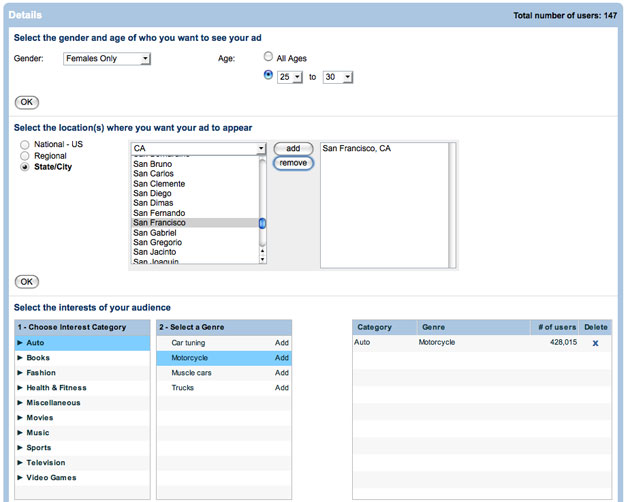
MySpace recently launched its self-serve advertisement platform, called “My Ads”. My Ads allows people put their configured target ads on it. People wonder whether My Ads would come to its “Google Moment”, a term that appears when Google applied its contextual advertising and became more than a great search engine.

There come the following features:

1, Images are allowed to be put onto the ads, including 728×90 or 300×250 pixels format. Facebook launched this kind of ads platform before, but there is no image allowed on those ads.

2, Those ads basically are charged by each visitor’s click, the same way as “Xing”, a platform that connects business people and use employment ads as the revenue source. My Ads also let the advertisers pay less if the ads’ click rate tends to be high.

3, MySpace focus on the target technology in order to create the most efficient advertising way for users. Based on its huge user number and the large amount activities and interactivities, MySpace could judge the users’ preference with 1,200 different ways to categorize each user. Facebook also could target ads, but very limited, only use the preference that set by users themselves.


Website CEOs must keep thinking about taking advantage of their sites’ special values. Facebook has its flexible communication ways and multiply function applications. MySpace has its large amount of user information. Other sites focus on their special fields and aim more accurately. How to make good use of those values and how to build a revenue machine? Let’s go on and see how the My Ads works in the future.

OpenOffice 3.0 is available now!

The 3.0 of OpenOffice.org are available now! If you want to download it, here is the entrance. >>Download<<.
This just-released version provides eight languages support, including Danish, English, French, German, Italian, Japanese, Russian and Swedish. The speed of start-up is much faster than that of the previous versions. This kind of improvement is appreciated greatly. At the same time, OpenOffice 3.0 supports the file format of Microsoft Office 2007.(e.g .docx, pptx, xlsx). Certainly, There are other new features which are also very attractive.(>>click here for the release note<< ). Before 3.0 , there was a version named “PortTable”, it had already show the good performance. Particularly, you can save file directly as “pdf “ format. This feature released you from the trouble of files transformations a lot . However, that version had the same problem of other versions: slower start-up. Anyway, in the competition with Microsoft office, OpenOffice really did a good job and it is free for everyone.

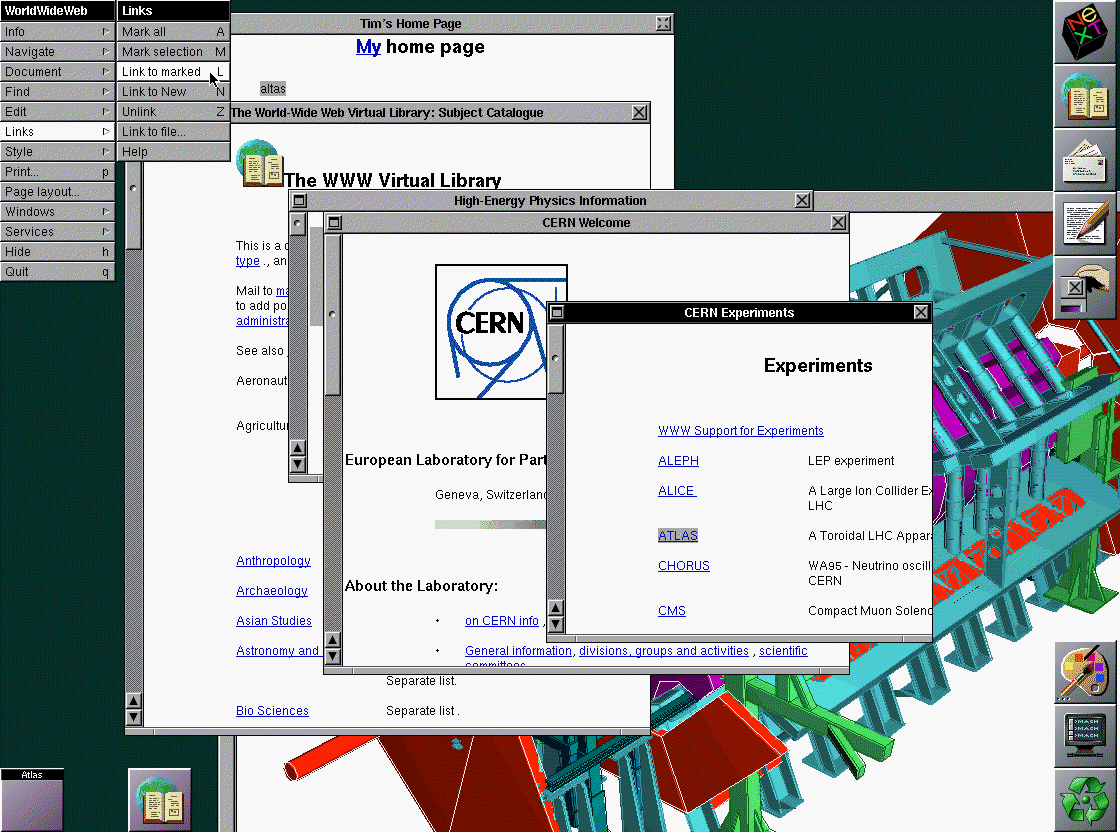
The First Internet Based Global Information Sharing

This blog is a small part of my effort to understand the WWW.I believe to comprehend something, it is very important to know its history: Where it all start from? How did it get the form it has today?

The answer to such questions helps to get better appreciation.

I decided to write about how did the first internet based information sharing (which was launched worldwide) look like (features)!

Most part of this article is taken from the Original Designs and Issues associated with WWW.

“In 1989 Tim Berners-Lee invented the World Wide Web, an internet-based hypermedia initiative for global information sharing while at CERN and wrote the first web client and server in 1990.”

How did it all begin?

Hypertext was used for several purposes but all of them were for reading the information off a hard media.

At CERN there was a need felt to have a system where all this information could be read off a network in a parallel fashion by several clients.

Features:

The product was intended to have the following minimum features.

1. Platform independent:

It was emphasized that the design be platform independent and can be used on any OS (although then there were just a few available compared to today).

2. Navigation :

The ease of navigation was one of the must haves which called for the following:

Structured architecture and use of Graphical tools.

History: Allows moving back and forth, going to a specific page etc.

Making navigation intelligent by implementing:

Documents rating by author, by number of clicks, by number of searches.

Search algorithm which is efficient both in terms of results as well as time

Indexing, node links and menu links were few others in the list.

3. Versioning:

The reason to employ the tracking versions was to make accountability possible. The previous and the current versions if stored in cache, could be compared and called for when required.

4. Multi-user:

Annotation: needed if reading and writing is done at the same time

Protection: prevent unauthorized users from reading and writing

Privacy : for users

5. Notification system:

Notify the users or clients on availability of new material, changes and other news.

6. Topology:

This takes care of the method in which hypertexts are going to be connected to each other.

After the above mentioned features were achieved, it became important that the systems that worked together need to agree at various points which included:

1. Naming and addressing:

“This is probably the most crucial aspect of design and standardization in an open hypertext system. It concerns the syntax of a name by which a document or part of a document (an anchor) is referenced from anywhere else in the world.”


2. Protocols:

HTTP related protocols that needed to be common among client and server : FTP, IMAP, MIME etc. For example FTP is the common file transfer protocol used.

3. Format of the document:

Basic format to be followed by all (must have format) which included 80-column text and basic hypertext.

Convertible format which allowed the conversion of the document into the format available at the client’s side. Thirds type is a negotiable format.

Hope this gives a better understanding internet as WWW is popularly known.

Screen Shot- The first browser by TBL